Example builds for small teams

Start with real work

Focused builds for repetitive work, scattered documentation, and service websites. Each starts with a real routine, keeps a clear human owner, and ends with something your team can use.

Three categories Nine first versions Three shipped products Clear human control

What these examples show

Narrow scope, working result

Every example here shows the shape of a first version we scope, build, test, and hand over: one routine, one owner, one build your team can run on its own files.

Three of them are shipped products of our own: SinceWake, Card to Contact, and the SinceWake website. They are marked as shipped, so you can judge finished quality, not just scope.

When a project needs sensitive data, regulated decisions, or a complex core-system change, it needs separate scoping before work starts.

01 Custom applications

Small tools for repeat work

Quote builder

From brief to quote

A small internal tool turns a structured service brief into a consistent quote. The owner selects services, applies agreed rules, reviews the total, and exports a client-ready PDF or email draft.

Human control The owner approves pricing and wording before anything is sent.

Handoff Hosted tool, editable pricing data, and a short operating guide.
Operations dashboard

One view of live work

A compact dashboard brings work status, owner, deadline, missing input, and next action into one view. It highlights stalled items without trying to replace every system the team already uses.

Human control The team decides status changes and priorities.

Handoff Focused dashboard, source mapping, and update instructions.

File parser

Extract then review

A local script or small app extracts agreed fields from recurring PDF, CSV, or spreadsheet files, validates basic rules, and creates a reviewable output. Unclear values stay visible for a person to check.

Human control A person resolves exceptions and approves the final output.

Handoff Parser, input template, exception notes, and example output.

What a handover run looks like

A first build is something you run yourself: one command against the files you already have, a readable log, and a short review list for anything the script refused to guess.

Illustrative run - not a client artifact

$ python cleanup.py ./exports

scanning 47 files .......... ok

merging 12 csv exports ..... ok

fixing 312 date formats .... ok

removing duplicates ........ 6 gone

flagging edge cases ........ 9 rows → review.xlsx

writing report_2026-08.pdf . ✓ done

41 seconds. This used to take a monday morning.

Runs locally · your data never leaves the machine

Shipped · our own app

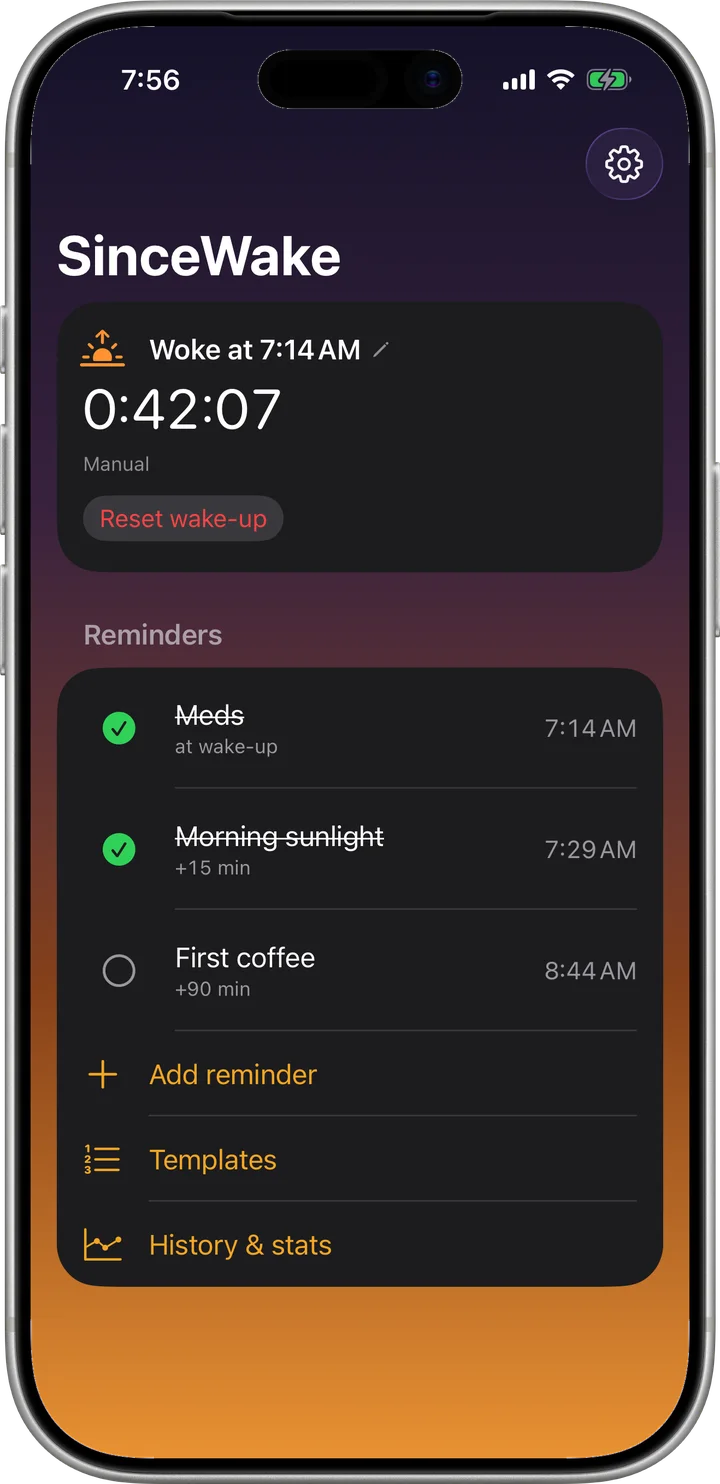
SinceWake for iPhone

Morning reminders anchored to the moment a person actually woke up, not to a time set the night before. The iPhone reconstructs the wake from motion history, Health sleep data, and Sleep Focus. An Apple Watch sharpens detection and is never required. The whole chain moves with the real wake-up: medication at +0, daylight at +30, coffee at +90.

Human control Strong evidence anchors the morning and says so, with one tap to undo. Weak evidence asks on the lock screen instead of guessing.

Privacy Night data stays on the person's devices. No account, no analytics, no server.

Platform
iOS 17, watchOS 10 companion, home-screen widgets, Live Activity
Built with
SwiftUI, HealthKit, Core Motion, WatchConnectivity, StoreKit
Detection
Six wake signals, tolerant of a 5 am bathroom trip, tuned to the person over time
Status
Public TestFlight beta, App Store release in preparation
SinceWake home screen on iPhone at 7:56: woke at 7:14, 42 minutes since wake, meds and morning sunlight ticked off, first coffee still ahead, shown in a silver iPhone 17 Pro

Shipped · our own app

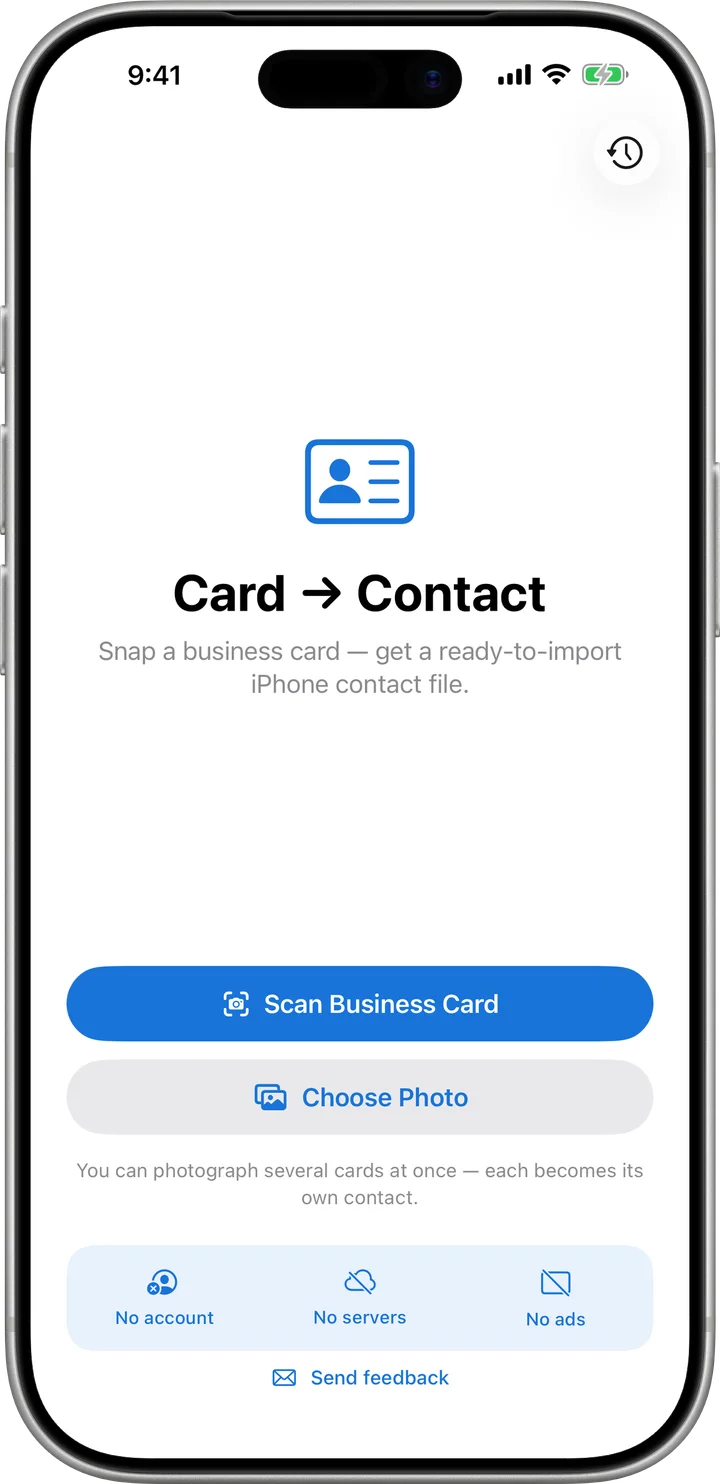
Card to Contact

One job: a photo of a business card becomes a contact on the iPhone. The camera crops and straightens the card, on-device text recognition reads Russian and English, and a review screen shows every field before anything is saved. Two-sided cards, QR codes, and the card photo as the contact picture are handled along the way. Published on the App Store as BC2C.

Human control Uncertain fields are flagged, never guessed. The person edits the result and decides whether to save, share, or discard it.

Privacy Photos and contacts never leave the phone. No server, no account, no ads, nothing collected.

Platform
iOS 17, with a share extension for card photos from other apps
Built with
SwiftUI, VisionKit document camera, Vision text recognition, Contacts
Output
Saved straight to Contacts with duplicate check, or a vCard file for AirDrop and Files
Status
On the App Store. Free to start, with a Pro plan for scanning a whole table of cards and CSV export
Card to Contact home screen: the Card to Contact title, a Scan Business Card button, a Choose Photo button, and the badges No account, No servers, No ads, shown in a silver iPhone 17 Pro

02 Documentation cleanup

Make the work findable

Knowledge base reset

One clear home

A concise knowledge base brings the most useful instructions out of old docs, chat threads, folders, and individual memory. Outdated pages are marked instead of being silently treated as current.

Human control A named owner confirms what is current and approves sensitive guidance.

Handoff Structured workspace, content map, editorial rules, and a next-documents backlog.

Client onboarding

Less chasing before work

A single playbook explains what happens after the first message, which details are needed, where files go, and who owns each next step. It can pair with a simple intake form.

Human control The business decides policy, scope, and client communication.

Handoff Editable playbook, request checklist, client template, and handover checklist.

Procedure library

Hand over the routine

A compact set of procedures captures the trigger, inputs, steps, checks, exceptions, owner, and expected output for the routines that matter most.

Human control The process owner validates each procedure against real work.

Handoff Reusable template, completed priority procedures, and a review cadence.

03 Websites

A clear way to start

Service landing page

One offer, one next step

A fast page states the offer, who it is for, what the first engagement includes, and how to start. It uses one clear request path instead of a broad corporate site.

Human control The business owns claims, prices, legal wording, and request responses.

Handoff Deployed static page, source files, form routing, and an update guide.

Service catalogue

Choose before you ask

A simple service site groups offers, clarifies scope and starting points, and collects the information needed for a useful reply through a focused request form.

Human control The business confirms scope and replies personally before accepting work.

Handoff Responsive site, structured service content, request form, and basic analytics setup.

Pre-check page

Qualify before the call

A short page guides visitors through the key questions, explains what happens next, and sends the owner a structured brief. It does not make regulated decisions.

Human control A person reviews every submission and makes the final decision.

Handoff Public page, editable questions, structured notification, and operations notes.

Shipped · our own website

The SinceWake website

The product page for the app above. One offer, the problem with fixed-time reminders, how detection works, the watch question answered, pricing, FAQ, and a single call to action. Support and privacy pages sit alongside, with a feedback form checked by Turnstile and handled at the edge.

Human control Claims, prices, and legal wording are owned by the product team. Every feedback message is read by a person.

Handoff Static source in the app repository, deployed automatically on push, with an update path that needs no build tool.

Stack
Hand-written HTML, CSS, and a small script. No framework, no build step
Hosting
Cloudflare Pages, one Pages Function for the feedback form
Weight
About 45 KB of HTML, CSS, and JavaScript before fonts
Security
Strict Content Security Policy, HSTS, self-hosted fonts, no trackers
Pages
Landing, support, privacy, custom 404

Start with your real work

Show us the manual part

Tell us what repeats now and what a useful result would look like. We will help identify the smallest first version worth shipping.

If the form fails, email [email protected] directly.

Reference file
No files chosen
Optional. PDF, DOC/DOCX, TXT, CSV, XLS/XLSX, PNG, or JPG. Total size up to 10 MB. Avoid confidential or regulated data.

We reply by email after a quick scope check. Use sanitized examples for sensitive work.